
My Teams Unassigned
Any ticket that comes in under your categories, or that gets escalated, lands in the My Teams Unassigned view.
This is the most important view to check regularly. We always want this number to be zero.
Claiming a Ticket
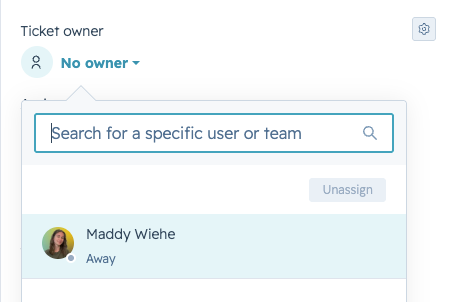
If you're available to take on a ticket, click on it and go to the Ticket Owner field on the right-hand side. Select the dropdown and choose your name.
This assigns the ticket to you and indicates that you are responsible for responding to and resolving this ticket.
|
IMPORTANT If you don't see anything in the center column, don't be concerned — check the Ticket Description field on the right-hand side. It will always tell you what question the guardian asked or what note you need to be aware of. |
My Tickets
Once you assign yourself a ticket, it's removed from My Teams Unassigned and moves into your My Tickets view. It stays there and it's your responsibility to respond to, work, and resolve it until you close it out.