
In the event that the ticket needs to be sent to an admin or DSO, you can escalate the ticket which will automatically notify them that a ticket needs their attention.
There are two steps to escalate a ticket:
- First, leave a note communicating to the admin or DSO why you are escalating the ticket.
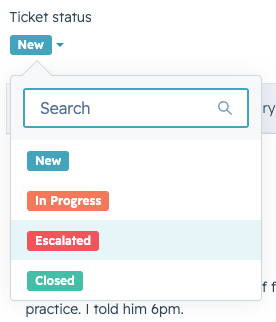
- Then, select Ticket Status and click Escalated:
|
NOTE: If a ticket isn't responded to or closed within the SLA timeframe, it will automatically shift to Escalated. Once a ticket is shifted to Escalated, it will be removed from your view and will be sent to the admins or DSOs. When that happens, the admin or DSO will pick up the ticket as they are available and will take over ownership of the ticket. This means that it is no longer your responsibility to respond to and resolve the ticket and you can move into the next ticket on your plate. |