
The Family Support Card
The Family Support Card is the form used to log phone calls and in-person guardian interactions and will create a ticket once submitted. It lives in the Overview tab of a Guardian record (Guardian records only -- not Student records).
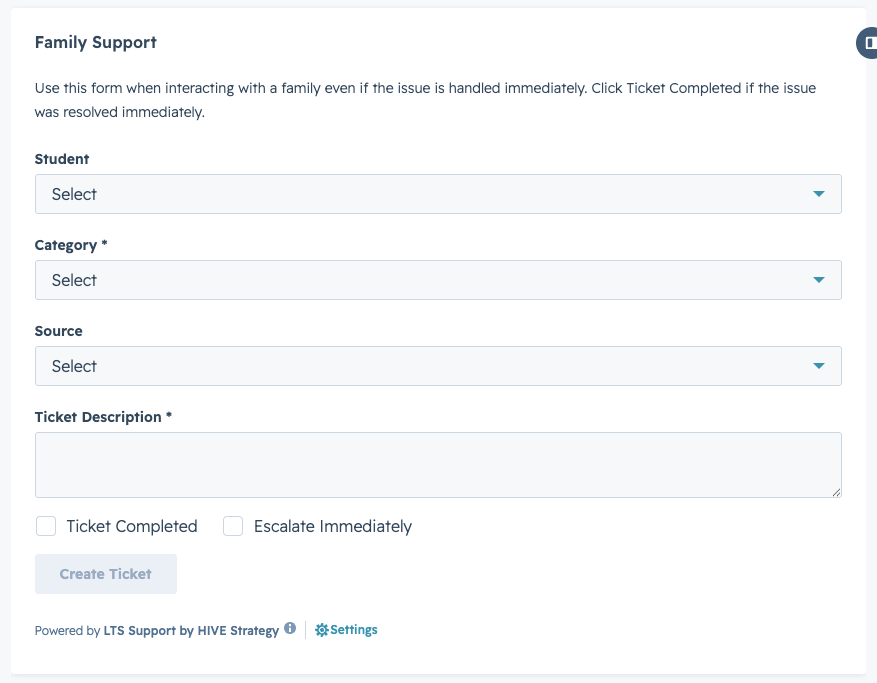
Required Fields:
- Student: Select which student the guardian is calling about. If a guardian has multiple students, all will appear in this dropdown.
- Category: This is the most important field: it determines who owns and resolves the ticket. Take time to familiarize yourself with the available categories.
- Source: Select "Phone" for phone inquiries.
- Ticket Description: Jot down the guardian's question. This is the note that will be sent to the team.
|
IMPORTANT You do not need to memorize who is responsible for each category. HubSpot routes it automatically. Just select the category that best matches the conversation. |
Situational Fields:
Two additional options appear on the form:
- Ticket Completed: Check this only if you were able to fully answer the guardian's question during the call. Even if the issue is resolved, still log the question and how you resolved it — this protects you if there's ever a dispute about what was communicated.
- Escalate Immediately: Check this if the situation needs an admin or DSO's attention right away, regardless of what category it would normally route to.
|
NOTE When a ticket is marked Ticket Completed, there is a 1-minute delay before its status automatically updates from New to Closed. This gives HubSpot time to process the record. |