
Ticket Views
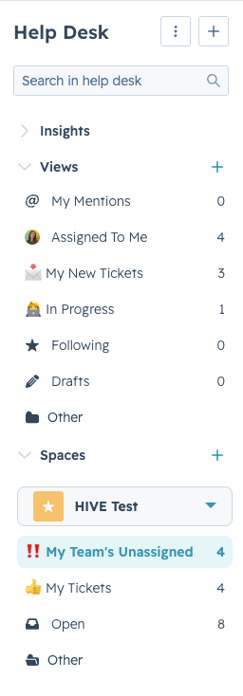
Views are how tickets are sorted, and meant to help you quickly find tickets you need to be aware of.
Note:
Your team will primarily use the custom views, showing underneath the Spaces drop down and your campus.
Important Views
My Team’s Unassigned: Always start your day in this view. This will show you any new tickets that need to be addressed.
My Tickets: These are tickets that you have picked up and are responsible for responding to and resolving.
Honorable Mentions
My Mentions: Will show you any ticket where another team member has tagged you in an internal note, regardless of who owns the ticket.
Following: Will show tickets that you have chosen to follow.
Drafts: Will show any ticket where you started to draft an email but have not sent it yet.